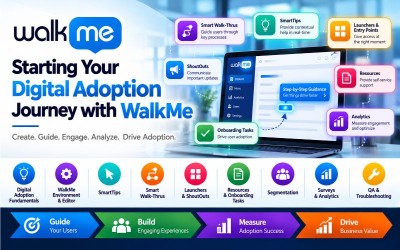
Starting Your Digital Adoption Journey with WalkMe is a comprehensive enterprise training program designed for Digital Adoption Specialists, WalkMe Builders, Business Analysts, SAP Consultants, Digital Transformation Professionals, Learning & Development Teams, Product Managers, IT Administrators, Change Management Consultants, and Enterprise Application Owners who want to design, build, deploy, and optimize digital adoption solutions using the WalkMe Digital Adoption Platform (DAP).
This course provides practical knowledge of Digital Adoption, Digital Transformation, WalkMe Editor, WalkMe Apps, SmartTips, Smart Walk-Thrus, Launchers, ShoutOuts, Segmentation, Resources, Onboarding Tasks, Condition Builder, Surveys, QA & Troubleshooting, Publishing, Analytics, and WalkMe Engagement Metrics.
Following WalkMe's official Learning Journey, the course begins by introducing Digital Adoption and WalkMe fundamentals before progressing to building WalkMe solutions, implementing advanced features, analyzing engagement metrics, and optimizing digital adoption experiences.
Digital transformation initiatives often fail because users struggle to adopt new enterprise applications efficiently. WalkMe, a leading Digital Adoption Platform (DAP), helps organizations improve user adoption by providing contextual guidance, interactive walkthroughs, onboarding experiences, automation, and in-app support across enterprise applications.
This course introduces the complete WalkMe implementation journey, beginning with Digital Adoption concepts and progressing through building interactive guidance using WalkMe Editor, Smart Walk-Thrus, SmartTips, Launchers, ShoutOuts, Segmentation, Resources, Surveys, QA processes, analytics, and optimization techniques.
Throughout the course, learners will gain practical experience designing and implementing digital adoption solutions that improve user productivity, reduce support costs, accelerate onboarding, and maximize software adoption across enterprise applications.
By the end of this course, participants will have the practical knowledge required to create, deploy, monitor, and optimize WalkMe solutions while supporting enterprise digital transformation initiatives.
These roles are increasingly sought after across enterprises implementing ERP, CRM, HRMS, finance, healthcare, retail, banking, insurance, manufacturing, and cloud-based business applications.
This course is designed to support learners preparing for the official WalkMe Learning Journey by covering Digital Adoption fundamentals, WalkMe solution development, advanced content building, analytics, QA, and optimization techniques.
Participants will gain practical knowledge in:
The course combines conceptual understanding with hands-on implementation to prepare learners for real-world WalkMe deployment projects.

Digital Adoption is essential for helping employees and customers successfully use enterprise software and digital platforms. Organizations invest heavily in business applications, but without effective user guidance and adoption strategies, software implementations often fail to achieve their expected business value. WalkMe addresses this challenge by providing interactive guidance, contextual assistance, and in-app experiences that improve user engagement and productivity.
This module introduces the core concepts of Digital Adoption, Digital Transformation, and the WalkMe Digital Adoption Platform (DAP). Learners will explore WalkMe's value proposition, success methodology, implementation approach, and how digital adoption accelerates enterprise transformation.
By the end of this module, learners will understand Digital Adoption principles, WalkMe's business value, and the foundation required for building effective digital adoption experiences.
According to the official WalkMe Learning Journey, this module covers Digital Adoption, Digital Transformation, WalkMe's value, and WalkMe Success Methodology.
This introductory unit explains Digital Adoption and Digital Transformation while introducing the WalkMe Digital Adoption Platform. Participants will understand why organizations adopt WalkMe, how it improves software adoption, and how WalkMe supports enterprise transformation initiatives.
Building successful WalkMe solutions requires understanding the WalkMe environment, development tools, content-building process, user segmentation, contextual guidance, onboarding experiences, publishing, and quality assurance. WalkMe enables organizations to create interactive experiences that guide users through enterprise applications without modifying the underlying software.
This module introduces the WalkMe Editor, WalkMe Apps, SmartTips, Smart Walk-Thrus, Launchers, ShoutOuts, Resources, Segmentation, Entry Points, Menus, Onboarding Tasks, publishing workflows, and troubleshooting techniques.
By the end of this module, learners will be able to build, configure, test, publish, and troubleshoot WalkMe content for enterprise applications.
According to the official WalkMe Learning Journey, this module covers WalkMe Editor, WalkMe Apps, SmartTips, Smart Walk-Thrus, Resources, Launchers, ShoutOuts, Segmentation, Publishing, QA, and Troubleshooting.
Learn about the WalkMe development environment, the WalkMe Editor, supported applications, and the tools used to create digital adoption experiences.
Effective WalkMe implementations begin with proper planning. Learners will understand how to define user journeys, prioritize business objectives, and design effective digital adoption strategies.
Condition Builder enables WalkMe builders to create personalized experiences based on user behavior, application states, roles, and business logic.
SmartTips provide contextual guidance by displaying helpful information directly alongside application fields, improving user accuracy and reducing errors.
Smart Walk-Thrus guide users through multi-step business processes using interactive instructions and automation, improving task completion rates.
Learn how to organize, manage, optimize, and maintain Smart Walk-Thru flows for complex enterprise processes.
Resources provide users with quick access to documentation, help articles, training materials, videos, external links, and support content directly within enterprise applications. Learners will understand how to configure and organize Resources to improve user self-service and reduce support requests.
Shuttles provide quick navigation between frequently used pages, business applications, and workflows. Participants will learn how to configure Shuttles to improve navigation efficiency and enhance the overall user experience.
Onboarding Tasks help organizations guide new users through essential activities, ensuring successful adoption of enterprise applications by providing structured task lists and progress tracking.
Entry Points and the WalkMe Menu provide centralized access to guidance, walkthroughs, announcements, resources, and support content. Learners will configure navigation menus that help users discover available WalkMe experiences.
Launchers allow users to initiate WalkMe experiences from specific locations within an application, providing contextual assistance exactly when it is needed.
ShoutOuts display important announcements, feature updates, reminders, and notifications to users within enterprise applications. Participants will learn how to create engaging and informative ShoutOut experiences.
Segmentation enables organizations to deliver personalized WalkMe experiences based on user roles, departments, locations, application states, and business conditions, ensuring relevant guidance for every user.
Before deployment, WalkMe content must be previewed, validated, and published to ensure accuracy, usability, and compatibility with enterprise applications.
Troubleshooting ensures WalkMe content functions correctly across supported applications and browsers. Learners will identify, diagnose, and resolve common implementation issues while following QA best practices.
As organizations mature in their digital adoption initiatives, they require advanced WalkMe capabilities to deliver personalized, scalable, and data-driven user experiences. This module focuses on advanced solution design, customization, technical considerations, engagement optimization, surveys, analytics, and quality assurance.
Learners will explore advanced WalkMe development techniques, design customization, enhanced Smart Walk-Thrus and SmartTips, Launcher optimization, advanced Segmentation, Surveys, QA methodologies, and engagement analytics.
By the end of this module, learners will be able to build enterprise-grade WalkMe solutions that improve user engagement, measure adoption success, and continuously optimize digital experiences.
According to the official WalkMe Learning Journey, this module covers advanced WalkMe features, design customization, technical considerations, analytics, surveys, segmentation, and QA.
Successful enterprise implementations begin with strategic planning. Learners will design scalable WalkMe solutions aligned with organizational goals, user journeys, and business outcomes.
Customize WalkMe experiences to align with organizational branding, improve usability, and deliver consistent user experiences across enterprise applications.
Understand technical prerequisites, browser compatibility, deployment strategies, security considerations, and integration requirements necessary for successful WalkMe implementations.
Condition Builder enables WalkMe creators to develop advanced logic that dynamically controls content visibility and behavior based on user actions, application states, business rules, and contextual conditions. Participants will learn how to create intelligent and personalized digital adoption experiences using reusable conditional logic.
Advanced Smart Walk-Thrus allow organizations to guide users through complex business processes with improved branching logic, automation, validation, and personalized experiences that increase completion rates and reduce user errors.
Go beyond basic field guidance by enhancing SmartTips with contextual messaging, dynamic content, conditional visibility, and validation logic that improves user productivity and reduces support requests.
Launchers can be optimized to deliver contextual assistance at the right time and location within enterprise applications. Learners will configure advanced launcher behaviors, appearance settings, and targeting strategies.
Advanced ShoutOut customization allows organizations to create visually engaging announcements, release notifications, onboarding campaigns, and targeted communications that improve user engagement and software adoption.
Surveys help organizations gather valuable user feedback, measure satisfaction, identify adoption barriers, and improve digital experiences. Participants will learn to design effective surveys and analyze user responses.
Advanced Segmentation enables organizations to deliver highly personalized WalkMe experiences based on multiple user attributes, behaviors, departments, locations, permissions, and business scenarios.
Quality Assurance ensures WalkMe solutions are reliable, scalable, and production-ready. Learners will perform comprehensive testing, identify issues, validate deployments, and apply troubleshooting techniques to maintain high-quality digital adoption experiences.
Throughout this course, learners will complete hands-on exercises using the WalkMe Digital Adoption Platform (DAP), WalkMe Editor, and enterprise web applications to gain practical experience designing, building, deploying, and optimizing digital adoption solutions.
Participants will perform the following practical activities:
In this capstone project, learners will design and implement a complete WalkMe Digital Adoption Platform (DAP) solution for a fictional enterprise application.
Participants will configure the WalkMe environment, create Smart Walk-Thrus, SmartTips, Launchers, Resources, ShoutOuts, Segmentation, Surveys, and analytics while following enterprise best practices for deployment, quality assurance, and optimization.
The implementation project follows the complete Starting Your Digital Adoption Journey with WalkMe Learning Journey.
Develop:
Create:
Implement:
Perform:
Develop:
Upon successful completion of this capstone project, learners will be able to: